


Summary
Microsoft is introducing the Low Latency Profile of Windows 11 to accelerate app launches. The mechanism temporarily increases CPU performance while Windows detects any actions that can increase latency to ensure apps, the Start menu, Search, and other interface elements launch faster. Below, you can find out what it does and how to activate it.
It is really annoying to wait for the launch of any app, although you know your PC can perform many tasks simultaneously. To solve this problem, Microsoft introduced a new Low Latency Profile of Windows 11.
This feature was created to ensure better performance of various interface elements like the Start menu, Search, and flyouts. With the August 2026 update, Microsoft has extended the functionality of this profile to support launching regular applications.
The consequence is a faster Windows experience that does not require you to buy a new CPU and overclock the system manually. Microsoft’s work with Windows performance in general is aimed at decreasing minor delays that cause a feeling of slowness despite good hardware performance of a PC.
What Is the Low Latency Profile in Windows 11?
Windows low latency profile is a form of performance optimization in which Windows temporarily raises the CPU frequency upon detection of any interaction that calls for an instant reaction.
Rather than maintain the processor in a high-performance mode continuously, Windows gives it a brief boost while performing latency-sensitive tasks. This can be launching apps, opening menus, showing system flyouts, and other foreground interactions. According to reports, this boost usually takes only about a short while, from one to three seconds, before the processor goes back to its usual performance.
This is essential since maintaining high processor performance takes a lot of power and causes extra heat.
Why Does the App Launching Speed on Windows 11 Become Faster?
Application launching requires several actions to be performed. Windows has to find the application, load it, allocate memory, and execute the application. If the system is speedy, this process can occur almost instantaneously. But if we deal with older and weaker hardware, then it can take longer.
The Low Latency Profile tries to solve this problem by providing the CPU with extra performance capabilities during the application launch process. According to Microsoft testing done previously, there was an increase in speed of 40% in some situations when launching applications, but, of course, it depends on the hardware, application, workload, and many other factors of the system.
Thus, when talking about faster launching of applications on Windows 11, we cannot assume that all applications will be opening 40% faster. It would be more correct to consider the feature as an acceleration mechanism.
Also Read: How to Use Microsoft Copilot in Windows 11
What’s Different with the August 2026 Update?
Initially, the Low Latency mode was oriented mostly at work with the Windows shell. The examples include such things as the Start menu, Search functionality, and other elements of the Windows user interface.
Now Microsoft has made the optimization broader so that it can be used by ordinary application launches too. According to reports, after the August 2026 update, the functionality is now used when launching various applications. This significantly increases the practicality of the feature since launching applications is one of the most popular activities on PCs.
Enabling the Windows 11 Performance Feature
The great thing is that most people should not need to manually set the CPU configuration themselves.
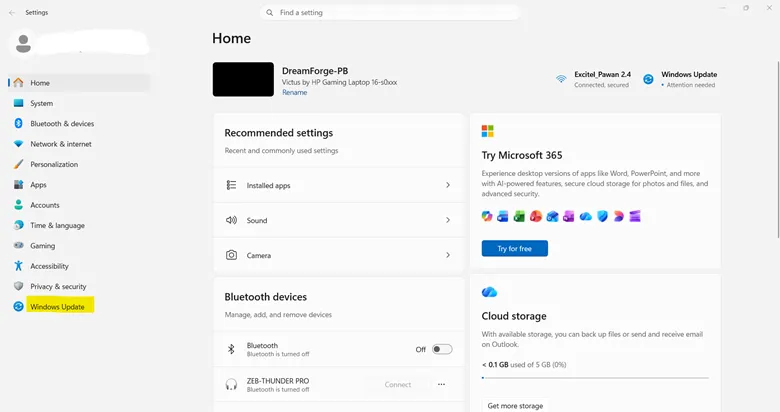
- Hit the Windows key and I simultaneously to launch Settings.
- Click Windows Update on the left-hand side menu.

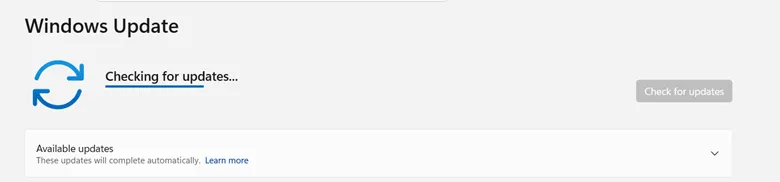
- Tap Check for updates and wait for Windows to look for available updates.
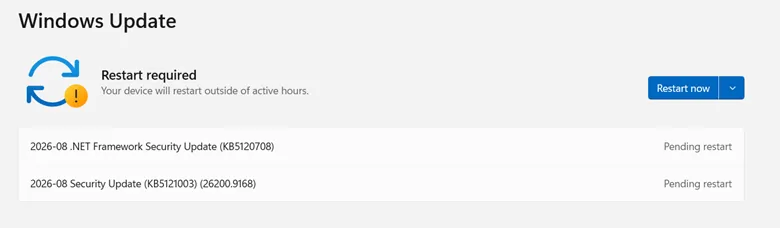
- Install the newest available Windows 11 update. Specifically, the update which is released in August 2026 is worth your attention, since it extends the Low Latency Profile to application launches.
- When the process of updating is finished, reboot your PC if Windows suggests you do so.
- It will let the new Windows components and their performance improvements work as intended.
Now start commonly used apps like Microsoft Edge, File Explorer, Settings, or any desktop apps.
One may see that apps launch faster, especially if CPU performance scaling causeda delay before. There is no special switch that one should toggle in order to enable the standard rollout of this feature.
Does Low Latency Profile Make Every PC Faster?
Such improvements will likely be more noticeable in computers where the scaling of CPU performance causes delays in quick interactive tasks. The optimizations by Microsoft have been done to improve responsiveness and not for the purpose of making the benchmarks faster. Your computer may already have high-performance hardware, and hence your applications may already load quickly. Then it becomes hard to tell the difference. The older or less performing machines might actually enjoy this improvement, as even a little improvement in the launch latency can make a lot of difference in your experience.
Will It Drain More Battery?
Since the feature does increase the CPU performance, the extra performance will definitely increase power consumption during the boost period. The intention behind doing this is to make use of the extra performance whenever required and not constantly running the CPU in the high-performance mode. Laptop users must pay attention to their battery usage in case of any Windows update.
What if There Is No Improvement to Speak of?
Do not fret if the sudden change will not make your computer seem like it was just given a second heart. Performance is dependent on many different aspects such as CPU speed, SSD speed, amount of RAM, background applications, startup programs, and the software itself. Apps that are still too slow can be sped up by minimizing unnecessary startup programs, closing resource-draining background applications, keeping Windows up-to-date, and making sure there is enough free space on the storage drive.
It should be noted that the Low Latency Profile is meant for short bursts of latency improvement. It is not intended to increase sustained performance of such tasks as video editing and gaming.
Windows 11 Performance is Getting Faster
The Low Latency Profile is one way that Microsoft is working on improving the overall performance of Windows 11 by reducing these small delays in the operating system. This may not come in the form of a new icon or redesigned UI. It’s about the many moments in the user’s day where they click Start, use Search, open an application, and use Windows itself.
There have also been references to other areas of focus on responsive interactions and lower latency in Windows applications. From the user standpoint, it will be seen as faster applications for Windows users to actually experience.
Conclusion
The new version of Windows is getting quicker in a very pragmatic manner. The new feature introduced by Microsoft allows the CPU to receive a temporary boost in performance when carrying out latency-critical operations and has been implemented in the August 2026 update of the system, which enables this function to take place when launching apps.
What is most interesting about this feature is that there is not necessarily anything difficult to set up. Update your Windows 11 and reboot your computer, and the system should handle all of the optimization on its own. The new feature will obviously depend greatly from one PC to another; however, it may prove helpful to older or weaker computers.


Leave a Reply