


Summary
Microsoft Copilot and ChatGPT are advanced AI assistants that are strong in their own ways. Copilot is ideal for Microsoft 365 users who need help with Word, Excel, Outlook, Teams, and productivity at work. ChatGPT is great at creative writing, programming, researching, studying, and performing various other tasks. Therefore, the best way forward would be to go for Copilot when it comes to Microsoft-related matters and ChatGPT when it comes to everything else.
AI has changed our approach to work, studies, and content creation. Whether it is writing emails, coding, summarizing long texts, or brainstorming ideas, AI assistants have become a must-have when it comes to productivity in our daily lives. Two of the most used AI assistants currently available are Microsoft Copilot and ChatGPT.
Even though both of these assistants use powerful AI models from OpenAI and despite the fact that there is a lot of similarity between the two, they still serve different purposes and have different features. And thus, people are often confused about which of the two they should use. This article aims to compare the features and strengths of both Microsoft Copilot and ChatGPT.
What Is Microsoft Copilot?
Microsoft Copilot is an AI assistant provided by Microsoft in its ecosystem, including Microsoft Copilot in Windows 11, Microsoft 365 products (Word, Excel, PowerPoint, Outlook, Teams), and Microsoft Edge browser. The basic feature of this AI assistant is the increase in productivity by creating documents, analyzing spreadsheets, summarizing emails, making presentations, etc. It is recommended for Microsoft 365 users, Office professionals, Enterprise organizations, Windows users, and Business productivity.
What Is ChatGPT?
ChatGPT is a conversational artificial intelligence assistant developed by OpenAI that is built to be used in multiple applications in both personal and professional life. ChatGPT can write content, give answers, make codes, explain anything, summarize, generate ideas, and much more. The difference between ChatGPT and Copilot is that ChatGPT can be used beyond the one ecosystem. It is perfect for Writers, Students, Developers, Researchers, Marketers, Freelancers, and Small businesses.
Feature-Based Comparison of Microsoft Copilot Vs ChatGPT
User Interface
Microsoft Copilot
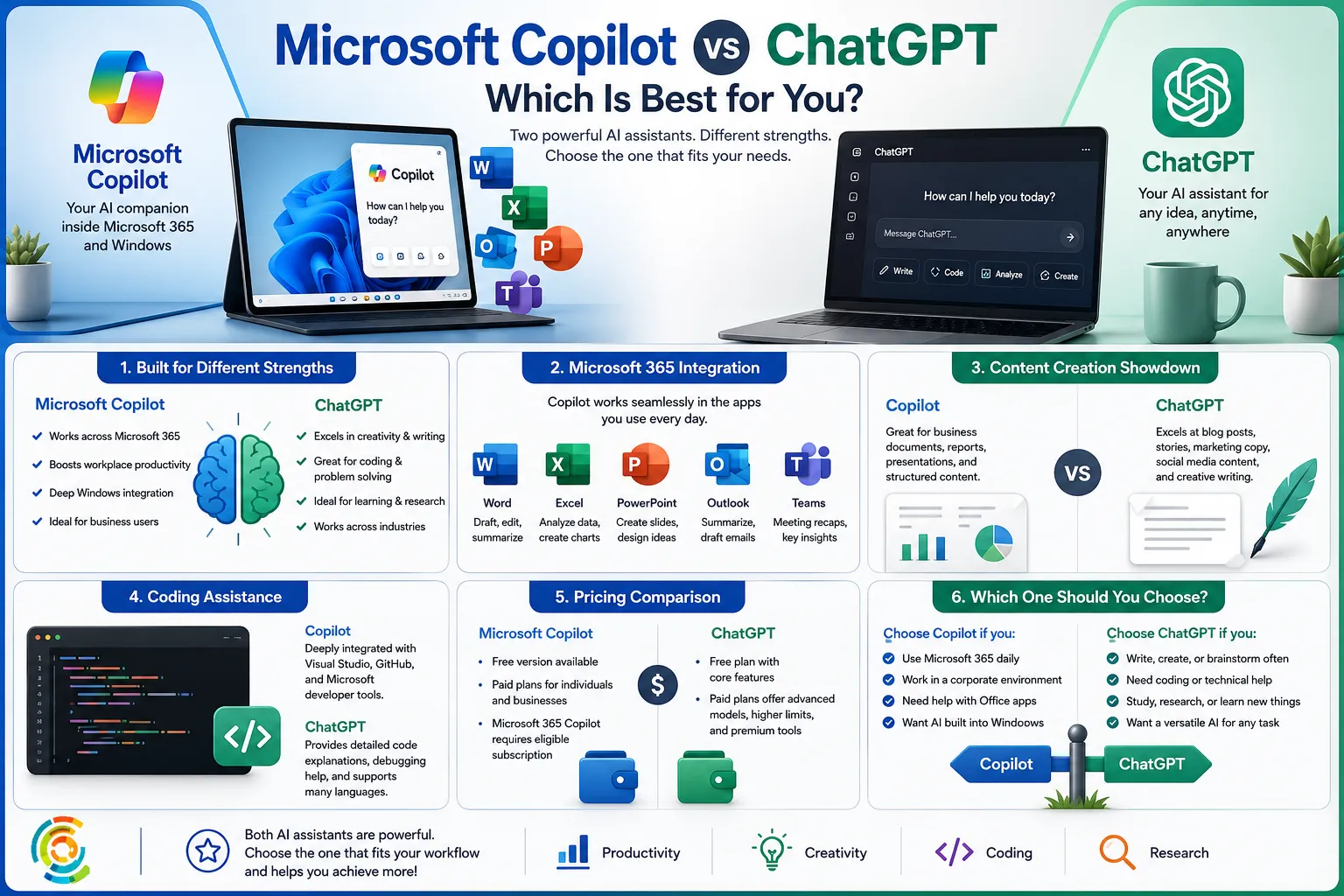
The Copilot interface adheres to the principle used by Microsoft, which entails having a clean user interface and seamless integration with Windows and Microsoft 365 applications. Rather than having to change back and forth between various applications, people will be able to use the AI tool while working on their work.
ChatGPT
The ChatGPT interface is conversational in nature. It can be found in the web browser, desktop application, and even mobile platforms. As such, for those individuals who are more flexible in terms of how to use their software, ChatGPT may be considered more advantageous.
Content Creation
If writing is the main job you need to do, ChatGPT would be better for you in this regard. This is because ChatGPT does exceptionally well in blog writing, marketing, product description, social media caption writing, scripts, story telling, and emails.
Microsoft Copilot can also help in writing very well, especially business-related documents.
Coding Assistance
The developers utilize AI in coding, debugging codes, explaining algorithms, performance optimization, and documentation generation.
ChatGPT supports many programming languages and offers an explanation in detail for beginners and experts.
Microsoft Copilot is equally efficient, particularly with Microsoft development tools, Visual Studio, and GitHub.
Microsoft 365 Integration
That’s where Microsoft Copilot excels. It can read Excel spreadsheets, make PowerPoint presentations, summarize Teams meetings, write Outlook emails, produce Word reports, and manage corporate documents. Since it has knowledge about your Microsoft files (with your organization’s permission), it becomes your workplace companion.
ChatGPT can help with file uploads but lacks Office integration like Microsoft Copilot.
Internet Research
Both the AI assistants are capable of searching the internet based on your plan and setting preferences.
ChatGPT usually gives better explanations and has better conversation follow-ups.
Microsoft Copilot gives Fast Web Summaries and Current News through Bing Search Results.
Image Generation
Both are used to generate AI images. You can generate Logos, Illustrations, Graphics for Social Media, Product Ideas, and Digital Art. ChatGPT gives you more freedom regarding prompt control and editing, while Copilot is faster at generating images.
Productivity
The common tasks that one performs at work include the creation of summaries of meetings, the writing of reports, making presentations, handling emails and scheduling.
In case your day-to-day job involves using Microsoft Office software, Copilot will save you much time.
On the other hand, ChatGPT will increase your productivity, although its use will be more general.
Accuracy
Neither of these tools is foolproof. They may both occasionally misinterpret user input, generate dated information, provide wrong data, and even make up sources. If it’s something serious, be sure to verify the information provided by AI.
Pricing
Microsoft Copilot
Free version available.
Paid Microsoft Copilot plans with additional business features.
Microsoft 365 Copilot requires an eligible Microsoft 365 subscription.
ChatGPT
Free plan available.
Paid plans unlock faster responses, advanced AI models, higher usage limits, enhanced tools, and additional features.
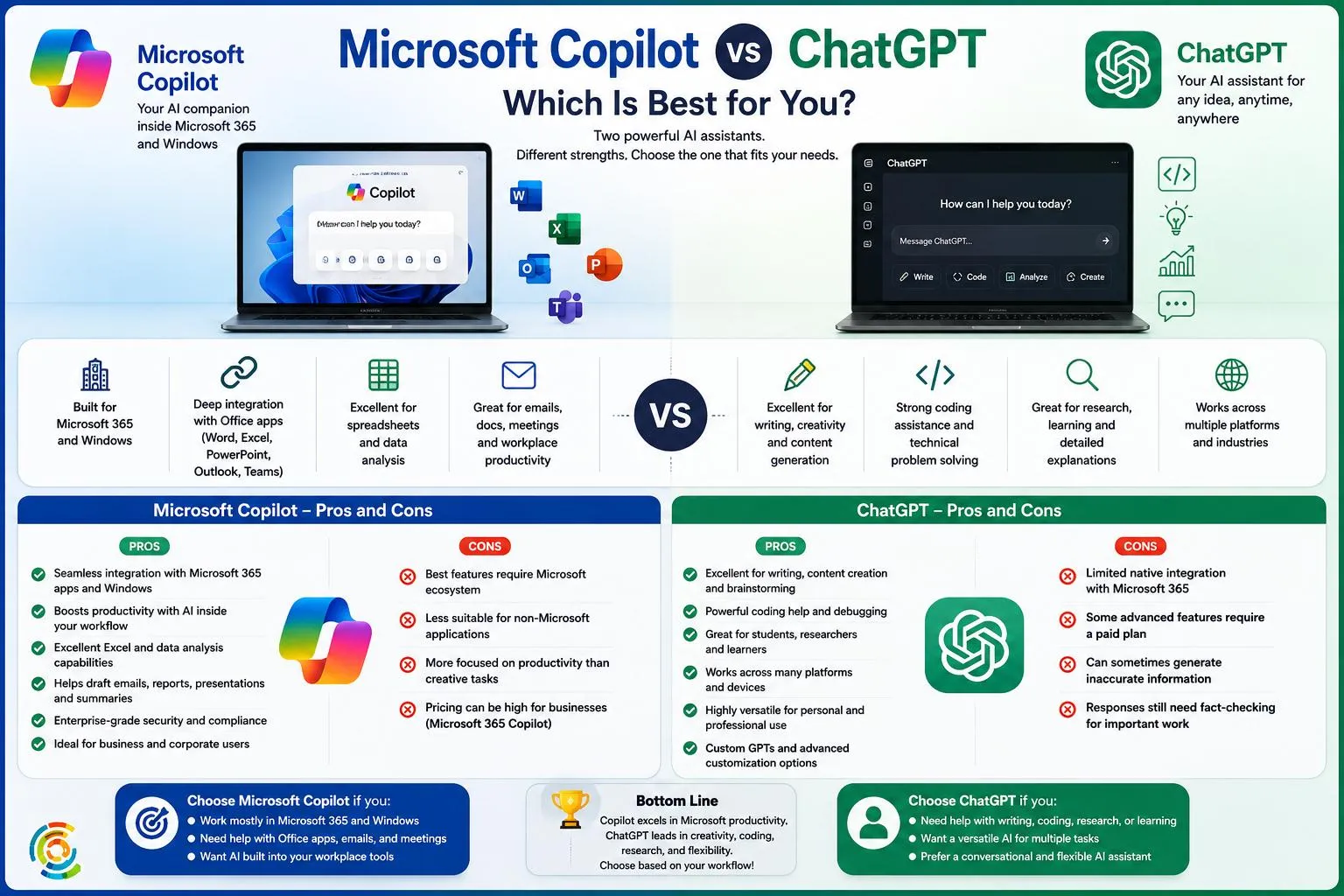
| Benefits Of Microsoft Copilot | Limitations Of Microsoft Copilot |
| Deeply integrated with Microsoft Office applications | Best features depend on the Microsoft environment |
| Good for business users | Not creative for long forms of writing |
| Strong Windows compatibility | Weak outside the Microsoft Office workflow |
| Good Excel support | |
| Productivity built-in |
| Benefits Of ChatGPT | Limitations Of ChatGPT |
| Excellent writing skills | Limited compatibility with Office products |
| High-quality coding abilities | Several advanced features need a premium subscription |
| Great conversational AI system | Fact-checking is required |
| Industry-agnostic | |
| Very flexible |
Which AI Assistant Should You Choose?
If you have the below needs then you should choose Microsoft Copilot.
- Most of your time is spent on Microsoft Office
- Corporate working environment
- Need help in Excel, Word, Outlook, or Teams
- Want AI that is incorporated into Windows
In case you wish to perform the below actions, you should go for ChatGPT.
- Blogging or writing articles
- Coding help
- Researching or studying
- Marketing content creation
- Versatile AI assistant for multiple actions
- Conversational AI
Conclusion
There is no clear winner of the debate between Microsoft Copilot and ChatGPT, since each of these assistants has its unique strengths.
For those whose work revolves around Microsoft 365, Copilot is a better option, providing a smooth experience with perfect integration with Word, Excel, Outlook, and Teams. Copilot can be regarded as an intelligent work buddy who helps to handle office work.
However, ChatGPT is the better option for the most versatile AI assistant, featuring better conversational skills, creative writing, strong coding support, and versatility of application in many situations.





Leave a Reply